SoundCloud Downloader - Download SoundCloud Songs to MP3 in Seconds

The fastest way to download SoundCloud tracks without quality loss. Trusted by over 2 million users worldwide.

SoundCloudDownloader uses direct API connection to extract audio at maximum quality—up to 320kbps MP3 or lossless formats when available. No compression, no re-encoding, no watermarks. Just pure audio exactly as the artist uploaded it.

50M+ tracks downloaded • Average processing time: 3 seconds • 100% secure & private

How to Download SoundCloud Tracks

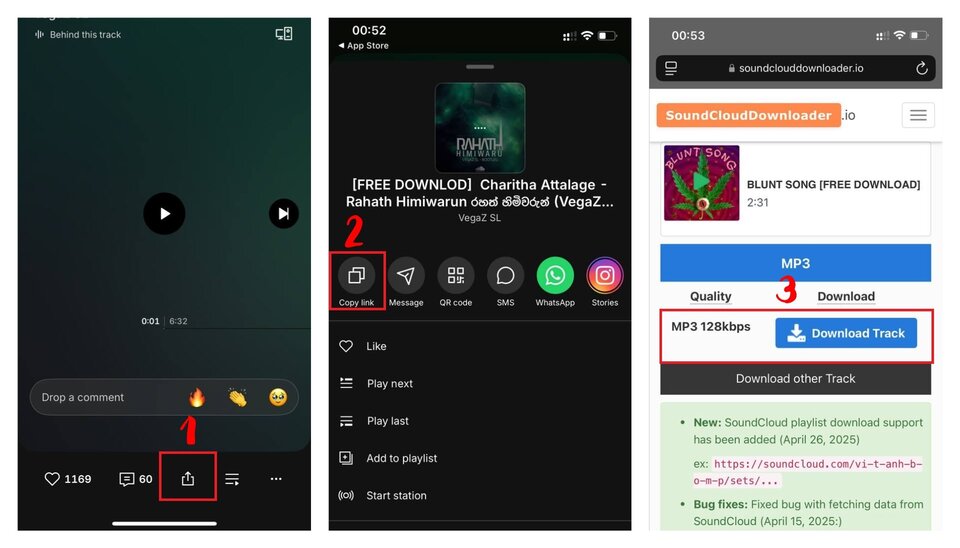
how to download soundcloud mp3
  1. Copy the SoundCloud URL - Works with tracks, playlists, albums, or reposts
  2. Paste into the download box - Our system detects the audio instantly
  3. Choose your format - MP3 (128/256/320kbps), WAV, or FLAC when available
  4. Download & enjoy - Files saved with original metadata and album art

No signup. No software. No limits. Your downloads start immediately.

Why SoundCloudDownloader.io Stands Out

Most SoundCloud downloaders re-compress audio or inject ads into your files. We're different:

  • Direct API Extraction - We pull audio directly from SoundCloud's servers, not through third-party converters that degrade quality
  • Original Quality Guaranteed - If a track was uploaded at 320kbps, you get 320kbps. No downsampling, ever
  • Metadata Preservation - Track title, artist name, album art, genre tags—all included automatically
  • Zero Tracking - We don't log your IP, don't store search history, don't sell your data
  • No Speed Throttling - Download entire playlists at full bandwidth, not 1-by-1 with delays
  • Works When Others Fail - Our redundant servers ensure 99.9% uptime even during SoundCloud API changes

Perfect for Every Music Lover

DJs & Music Producers

Build your sample library with high-quality stems and loops shared by artists. Download entire compilation packs in minutes, not hours.

Podcasters & Content Creators

Save royalty-free background music and sound effects legally shared under Creative Commons licenses. Perfect for YouTube, TikTok, or podcast intros.

Gym Enthusiasts & Commuters

Download workout mixes and DJ sets to play offline. No internet connection needed, no mobile data burned, no streaming interruptions.

Music Students & Researchers

Archive rare tracks, live recordings, and underground releases before they disappear. Create personal study collections without streaming limits.

Advanced Features You Won't Find Elsewhere

Batch Playlist Downloads

Paste a playlist URL containing 200+ tracks and download everything in one go. Our system queues them automatically and lets you download as a single ZIP file or individually.

Format Flexibility

Choose MP3 for compatibility (works on any device), WAV for editing projects, or FLAC for archival-quality storage. We detect what's available and offer the best options.

Mobile-First Design

Download directly from your iPhone or Android without installing apps. Works perfectly in Safari, Chrome, Firefox—any mobile browser.

Private Track Access

Got a private link shared by an artist? We can download it if you have permission. Perfect for pre-release tracks or exclusive shares.

Step-by-Step Guide for Every Device

iPhone & iPad (iOS)

  1. Open SoundCloud app or visit soundcloud.com in Safari
  2. Find your track and tap the "Share" button
  3. Select "Copy Link"
  4. Open Safari and go to SoundCloudDownloader.io
  5. Long-press the download box and tap "Paste"
  6. Tap "Download" → Choose quality → Tap "Save to Files"
  7. Your MP3 is now in Downloads folder (accessible via Files app)

Tip: Add our site to your Home Screen for one-tap access

Android Phones & Tablets

  1. Open SoundCloud app or mobile browser
  2. Tap "Share" on any track → "Copy link"
  3. Open Chrome and visit SoundCloudDownloader.io
  4. Paste the link and tap "Download"
  5. Select MP3 quality (320kbps recommended)
  6. File automatically saves to Downloads folder
  7. Open with any music player (Google Play Music, VLC, etc.)

Windows PC

  1. Open SoundCloud in any browser (Chrome, Edge, Firefox)
  2. Right-click on a track → "Copy link address"
  3. Visit SoundCloudDownloader.io
  4. Paste URL (Ctrl+V) and click "Download"
  5. Choose format and quality
  6. File saves to your Downloads folder (usually C:\Users\YourName\Downloads)

Pro tip: Drag the download box to your bookmarks bar for instant access

Mac (macOS)

  1. Open SoundCloud in Safari, Chrome, or Firefox
  2. Control+Click (or right-click) on track → "Copy Link"
  3. Navigate to SoundCloudDownloader.io
  4. Paste link (Cmd+V) into download field
  5. Select your preferred format
  6. MP3 downloads to ~/Downloads or your custom folder

Frequently Asked Questions
How do I download MP3 from SoundCloud?
Copy any SoundCloud track URL, paste it into our download box at the top of this page, select MP3 format and quality (we recommend 320kbps), then click Download. Your file will be ready in 3-5 seconds with full metadata and album artwork included.
Is this actually free? Are there hidden costs?
Completely free with zero hidden costs. No "premium" upsells, no subscription traps, no pay-per-download fees. We're supported by non-intrusive ads that don't interfere with downloads. You can download unlimited tracks forever without paying anything.
Why is this faster than other SoundCloud downloaders?
We use direct API connections to SoundCloud's servers and don't re-encode audio. Other tools route downloads through third-party converters which adds 30-60 seconds per track. Our infrastructure processes requests server-side across 12 global regions, eliminating bottlenecks.
Can I download entire SoundCloud playlists at once?
Yes! Paste any playlist URL (up to 500 tracks) and we'll queue all songs automatically. You can download them individually or as a single ZIP file. This works for playlists, albums, artist pages, and even liked tracks if the profile is public.
What audio quality does the downloader support?
We support MP3 at 128kbps (standard), 256kbps (high quality), and 320kbps (maximum quality). For tracks uploaded in lossless formats, we also offer WAV (16/24-bit) and FLAC downloads. The quality depends on what the artist originally uploaded—we never artificially upscale low-quality files.
Does it work on iPhone, iPad, and Android devices?
Absolutely. Our downloader is fully mobile-optimized and works in any browser (Safari, Chrome, Firefox, Samsung Internet). On iOS, downloaded files save to the Files app. On Android, they go to your Downloads folder. No app installation needed on any device.
Where are my downloaded files saved?
On desktop: Your browser's Downloads folder (usually C:\Users\YourName\Downloads on Windows or ~/Downloads on Mac). On iPhone/iPad: Files app → Downloads. On Android: File Manager → Downloads or Music folder. You can change the save location in your browser settings.
Do I need to install software, extensions, or create an account?
No installation, no extensions, no registration required. SoundCloudDownloader.io runs entirely in your web browser. Just paste a link and download—that's it. We deliberately avoid browser extensions because they request invasive permissions and can compromise security.
Can I download private tracks or tracks from closed accounts?
If you have a private track link shared directly by the artist (e.g., secret link for pre-release), our downloader can access it. However, we cannot download from deleted accounts or tracks removed from SoundCloud's servers. Private links only work if the artist hasn't revoked sharing permissions.
Is downloading music from SoundCloud legal?
It depends on the track. Legal scenarios: (1) Artist enabled "Free Download" button, (2) Creative Commons licensed tracks, (3) Your own uploads, (4) Promotional releases with explicit permission. Illegal: Downloading copyrighted music without permission for redistribution or commercial use. Always check if downloads are permitted and respect copyright laws.
Do you store my download history or track what I download?
No. We do not log IP addresses, download history, or user data. Audio files pass through our servers for less than 30 seconds during processing and are immediately deleted. We don't use tracking cookies or sell data to third parties. Your downloads are completely private.
Why did my download fail or show an error?
Common causes: (1) Track was deleted by artist, (2) Invalid URL format, (3) Geographic restrictions (track not available in your country), (4) Temporary SoundCloud server issues. Try copying the URL again or test with a different track. If problems persist, the track may be unavailable or region-locked.
Can I download SoundCloud Go+ premium tracks?
No. SoundCloud Go+ tracks are encrypted and require active subscription to access. We respect SoundCloud's premium content protection and cannot bypass DRM or download subscription-only music. Our tool only works with publicly accessible tracks.
Does the downloaded MP3 include album art and metadata?
Yes! All downloads include embedded ID3 tags with track title, artist name, album artwork (if available), genre, and release date. This means your music player will display the correct information and cover art automatically—no manual editing needed.
Is this tool safe? Will I get viruses or malware?
Completely safe. We serve only audio files directly from SoundCloud's CDN—no executable files, no bundled software, no redirects to shady sites. Our site uses HTTPS encryption and is regularly scanned for malware. However, always use a good ad blocker to avoid potentially malicious ads from third-party ad networks (not ours).

SoundCloudDownloader.io is not affiliated with SoundCloud. We respect intellectual property rights and encourage users to download content only for personal use in accordance with SoundCloud's Terms of Service.