How to Download SoundCloud Playlists
Step-by-step process
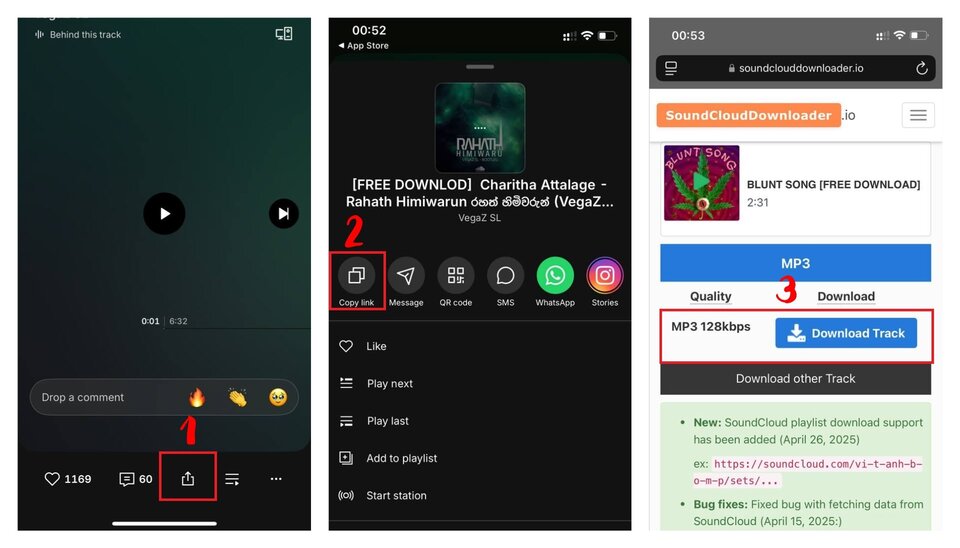
- Copy the full URL of the SoundCloud playlist (e.g., https://soundcloud.com/user/sets/...)
- Paste the URL into the input field above
- Click the download button
- Wait for the tool to fetch the list of tracks
- Download each track individually or batch-save the entire playlist as MP3s
If the playlist is public and contains valid tracks, the download links will be generated instantly.
Practical tips
- Ensure the playlist privacy setting is set to "Public" on SoundCloud.
- For large playlists (100+ tracks), processing might take a few extra seconds.
- Use a stable browser like Chrome, Safari, or Firefox for downloading multiple files.
Key Features of Our Playlist Downloader
Extract full playlists
Paste a single playlist link and get access to every public track inside it. No need to copy URLs one by one.
No login required
No account, no personal data, no access permissions needed. We do not store your files or track your activity. Processing happens directly in your browser.
High-quality MP3 extraction
The tool extracts the raw audio stream directly from SoundCloud servers, preserving the original broadcast quality (usually 128kbps MP3 or 256kbps AAC).
Cross-device compatibility
Works natively in mobile and desktop browsers. You can save whole playlists to your iPhone, Android, PC, or Mac.
Common Use Cases for Playlist Downloads
- Save DJ sets, mixtapes, and curated playlists for offline listening
- Backup your own uploaded SoundCloud sets securely to your local drive
- Download entire albums from independent artists in MP3 format
- Transfer large batches of tracks between devices easily
- Use extracted tracks for personal remixing or offline playback
Limitations and Notes
- Private playlists and private tracks cannot be processed.
- Tracks that have been deleted or region-locked by the uploader will fail to load.
- Audio quality output strictly matches what is currently hosted on SoundCloud.
- Respect copyright and usage rights when downloading and sharing content.
Frequently Asked Questions
SoundCloudDownloader.io is not affiliated with SoundCloud. We respect intellectual property rights and encourage users to download content only for personal use in accordance with SoundCloud's Terms of Service.