Download SoundCloud Audio to MP3 Instantly
Paste a SoundCloud track link above and download it as MP3 in seconds. The tool runs directly in your browser and does not require login or installation. It works on iPhone, Android, and desktop devices.
The process is straightforward: extract the audio from the provided link and generate a downloadable MP3 file. If high-quality audio is available from the source, it will be preserved in the output. This tool is designed for quick access, minimal steps, and consistent results across devices.
How to Download SoundCloud to MP3
Step-by-step
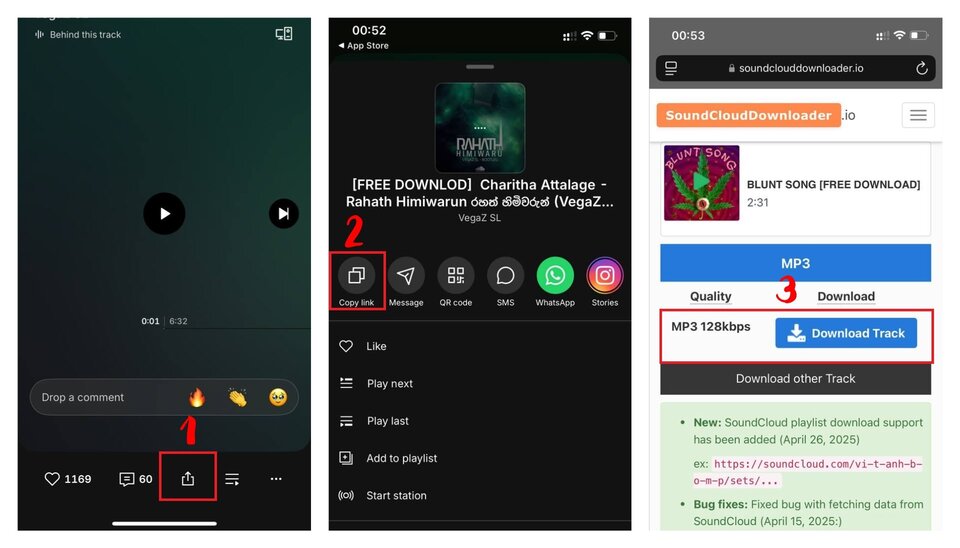
- Copy the SoundCloud track URL
- Paste the link into the input box above
- Click the download button
- Wait a few seconds for processing
- Download the MP3 file to your device
If the link is valid and publicly accessible, the file will be generated immediately.
Practical tips
- Use direct track URLs instead of shortened or redirected links
- If download fails, reload the page and retry with the original link
- For mobile, use a browser with file download support (Chrome or Safari)
Key Features
Fast browser-based conversion
No software installation. Processing starts instantly after you submit the link.
No login required
No account, no personal data, no access permissions needed. We do not store your files or track downloads. Processing happens directly in your browser.
High-quality MP3 output
The tool preserves the best available audio quality from the source track.
Works on all devices
Compatible with mobile browsers (iOS, Android) and desktop environments.
Common Use Cases
- Download SoundCloud tracks to listen offline
- Save music to your phone as MP3
- Keep a backup of your favorite tracks
- Convert SoundCloud audio for use in other apps
- Transfer audio files between devices easily
You can also check out our SoundCloud playlist downloader (download multiple tracks) and other audio converter tools to download music online or find MP3 downloader tools. Read our supported formats and quality guide for more info.
Limitations and Notes
- Private or restricted tracks cannot be processed
- Removed or unavailable content will fail
- Audio quality depends on the original upload
- Some tracks may have download restrictions from the source
- Respect copyright and usage rights when downloading content
FAQ
SoundCloudDownloader.io is not affiliated with SoundCloud. We respect intellectual property rights and encourage users to download content only for personal use in accordance with SoundCloud's Terms of Service.